10/13/2025
| Role & Scope | Systems/Platform Lead |
| Team | Customer Service, Professional Services, Operations, Accounting |
| Context | SaaS platform with regulated data; multiple departments using legacy and/or isolated systems |
| Duration | ~12 months (2023-2024); maintenance and further enhancements followed afterwards |
Context
Internal systems had become fragmented. Teams used multiple separate tools for daily Customer Service work, contracts, PS work, creating frequent data mismatches and manual handoffs. Internal stakeholders lacked real-time visibility into processes and reporting data required significant manipulation in order to generate actionable insights.
Challenge
Create a unified CRM and automation framework that aligned Sales → Fulfillment → PS → Accounting, improved data integrity, and enabled self-service for varying types of internal stakeholders (individual contributors, leads, managers, etc.), and merge two existing SQL-based legacy CRMs into a source of truth to serve as the basis of the new unified CRM system.
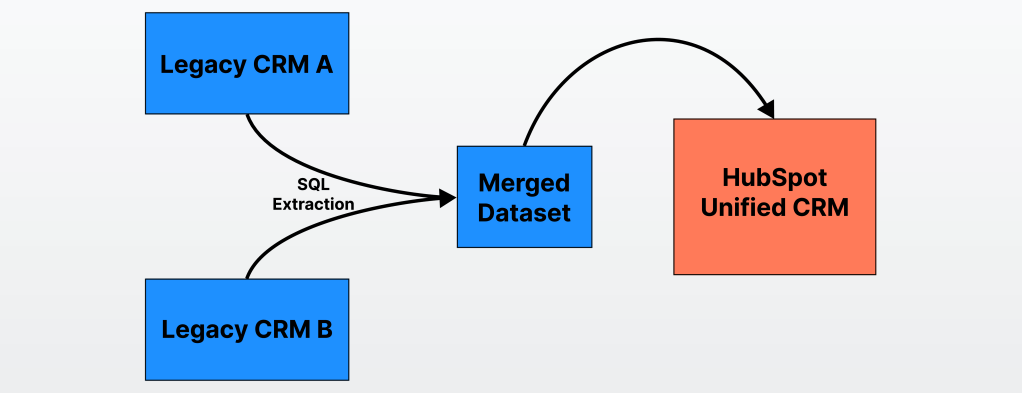
Figure 1. A diagram displaying two legacy CRMs being merged into a HubSpot CRM.
Role & Scope
I operated as the de facto systems designer and project lead during a leadership void in the CRM migration initiative, which at the time of my stepping in had already been going on for several quarters. I balanced normal responsibilities as an individual CS contributor (with progressively increasing informal leadership responsibilities over the course of the project) while coordinating the cross-departmental migration from two legacy CRMs to HubSpot, and became a Team Lead of Customer Services/Operations (+CRM administration) near the terminus of the project.
Core Responsibilities
- System Design: ERDs (Entity mapping), validation rules, data modeling
- Data Migration: Dual-CRM SQL extraction, merge, and verification
- Automation: HubSpot workflows and Make (iAaas) workflows
- Cross-functional Collaboration: Weekly syncs, departmental feedback loops
- Change Enablement: SOPs, diagrams, training assets
Constraints
- Leadership gap
- Minimal documentation
- Departmental silos
- Internal legacy-systems preference, new-systems resistance
Impact Scope
- Unified 5 departments in one CRM system
- Standardized a multi-hundred product library
- Created reliable data models and user interfaces, enabling adoption and reporting across the organization
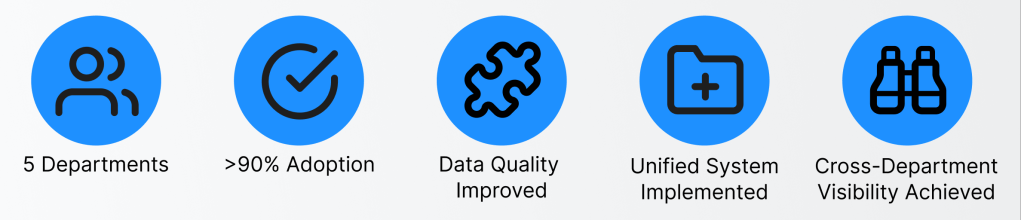
Figure 2. Project metrics displaying the highlights achieved.
Discovery / Research & Insights
Adaptive discovery was the research method utilized due to project leadership ambiguity. In this void, I took initiative to learn the project scope, prior attempts to categorize data, and processes through peer collaboration, documentation review, and trial-and-error.
1. Starting Point
- Context: Entered during leadership gap and stalled migration.
- Knowledge level: Limited exposure to backend systems; learned swiftly through peer collaboration, documentation review, and trial-and-error.
- Goal: Build understanding of existing workflows and data dependencies; develop a merged source of truth to import into new system.
2. Research Methods
| Method | Purpose | Example Output |
|---|---|---|
| Stakeholder interviews & shadowing | Understand how each department processed contracts, tickets, orders, invoices | Recorded session & notes in shared workspace; clarified confusion points with stakeholders |
| Problems analysis | Identify recurring friction and data discrepancies | Categorized daily organizational problems by root cause |
| Process mapping & gap audits | Visualize handoffs, reveal gaps, data duplication, and effort duplication | Drafted early process maps and diagrams |
| SQL data pulls (two legacy CRMs) | Quantify and validate system behavior | Unified dataset of customers, contracts, products, and contacts |
3. Key Findings
These were the findings which had significant impact on how I would think about approaching the project moving forward:
- Customers can hold multiple contracts/account numbers; early assumption proven invalid.
- Revenue recognition and billing logic differed by department.
- Reporting fields inconsistent or unused; heavy manual data entry.
- Staff turnover caused repeated process loss and “reinvention”.
- Cultural resistance: some departments preferred legacy systems.
4. Research Artifacts
- Consolidated product library
- Entity Relationship Diagrams (ERDs)
- Audit dashboards and Kanban review system
- Early iterations of product-tag taxonomy
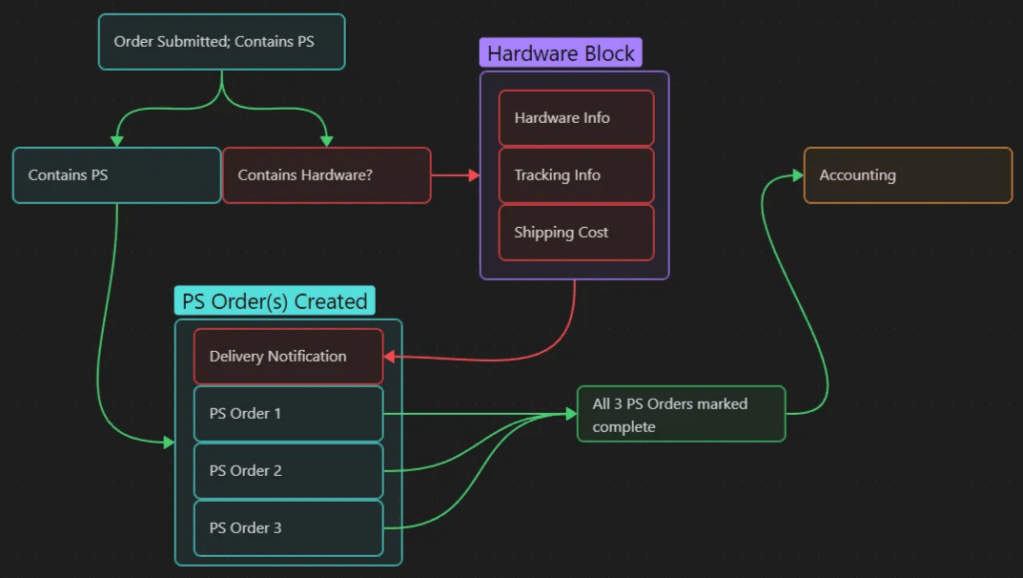
Figure 3. An early PS process mapping which accounts for Hardware also being present in an order.
5. Impact on Design
- Insights guided HubSpot object & associations schema and workflow logic
- Validation issues informed automation guardrails to implement
- Company culture and ownership gaps shaped change-management strategy utilized later.
Systems Design
Information Architecture & Data Modeling: Visuals
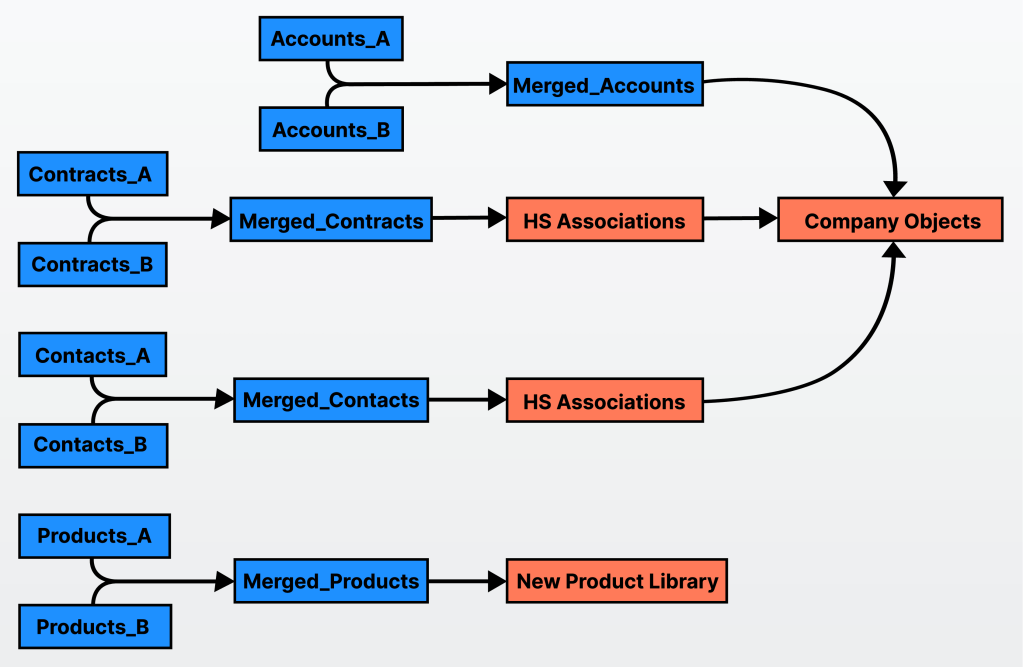
Figure 4. A mockup of data merge logic of the two legacy CRMs and how the merged set was populated in HubSpot.
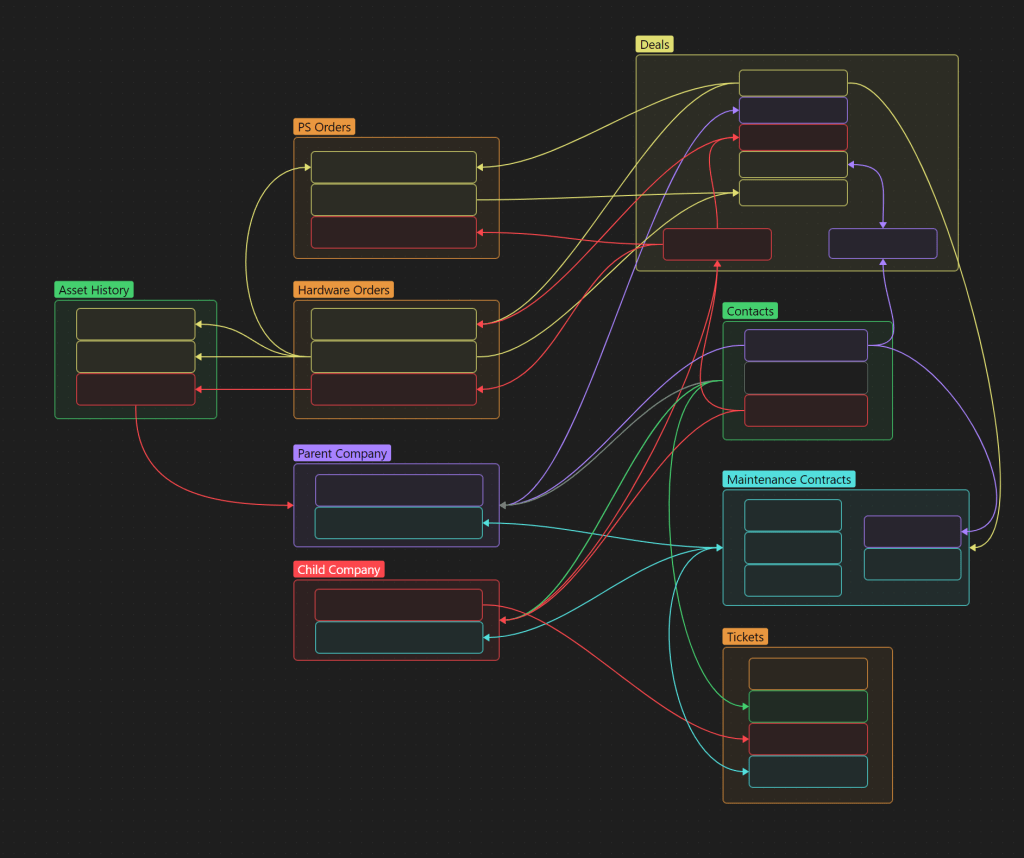
Figure 5. An ERD depicting HubSpot CRM objects, arrows indicating relationships.
Example Validation Rules
This table displays examples of validation logic, guardrails, and CRM governance to improve the quality of data propagating through all systems.
| Rule | Purpose |
|---|---|
| Required fields for records | Avoiding orphaned or incomplete records |
| Email format validation | Ensures deliverable communication fields; e.g., pattern *@*.* |
| Active flag enforcement | Helps prevent human error; e.g., an inactive Company cannot associate to an active deal |
| Deal requires association to ≥1 Company and ≥1 Contact | Ensures a minimum quality of reporting and billing |
| Prevent circular associations | Setting up associations as “one to many” helps maintain structure; e.g., prevents Company A owns Company B which owns Company A |
| Order items must correspond to active SKUs in Product Library | Blocks obsolete item IDs and older deals from causing issues in reporting/integrations |
| Make automations must only trigger after validation passes in HubSpot | Prevents API interaction with bad data |
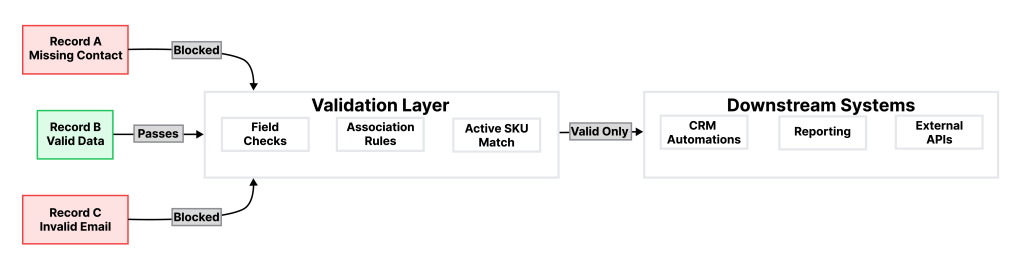
Figure 6. A system filtering bad data out and allowing good data to pass through to downstream systems.
Decision Rationale & Trade-offs
Phased Departmental Onboarding
| Decision | Roll out HubSpot per department (Sales → Support → Accounting → PS) |
|---|---|
| Rationale | Limited risk, allowed continuous feedback and better focus on one department’s problems at a time. |
| Trade-off | Extended project timeline but improved adoption, user sentiment, and system stability. |
| Impact | Allowed for iterative implementation and reduced cross-team confusion. The back-end was simpler to troubleshoot since more time was spent designing and implementing each department’s systems. Successfully onboarded all five departments. |
Systems Choice
| Decision | Split automation between HubSpot workflows and Make scenarios. |
|---|---|
| Rationale | HubSpot has workflow limitations that would have required costly custom development and maintenance to achieve desired functionality. HubSpot ensures permission control, record-state awareness, and audit history; Make handles multi-object logic, order creation, and cross-system API calls. |
| Trade-off | Maintenance and troubleshooting complexity increased due to managing two platforms, but automation gains produced significant time savings across departments, particularly PS, Production, and Accounting. |
| Impact | Improved system functionality and user experience. Reduced manual input and error risk. Larger automation projects spanning PS, Production, and Accounting yielded the most substantial efficiency gains. |
Validations prior to API Integrations
| Decision | Enforce validations inside HubSpot before Make APIs trigger. Branch out validation logic to notify users and admin of error type. |
|---|---|
| Rationale | Prevents bad data from propagating through the APIs and lessens the validation that has to be accomplished in the Make iAaas engine. |
| Trade-off | Slightly slower and more confusing user experience when saving records due to validation checks. Onboarding requirements for particular modules increased. |
| Impact | Fewer failed scenario runs; down over half from initial testing. Adding additional validation logic to determine HubSpot validation error type resulted in an easier-to-maintain system, allowing admins to spend more time figuring out where CRM improvements are needed and where CRM training is more beneficial. |
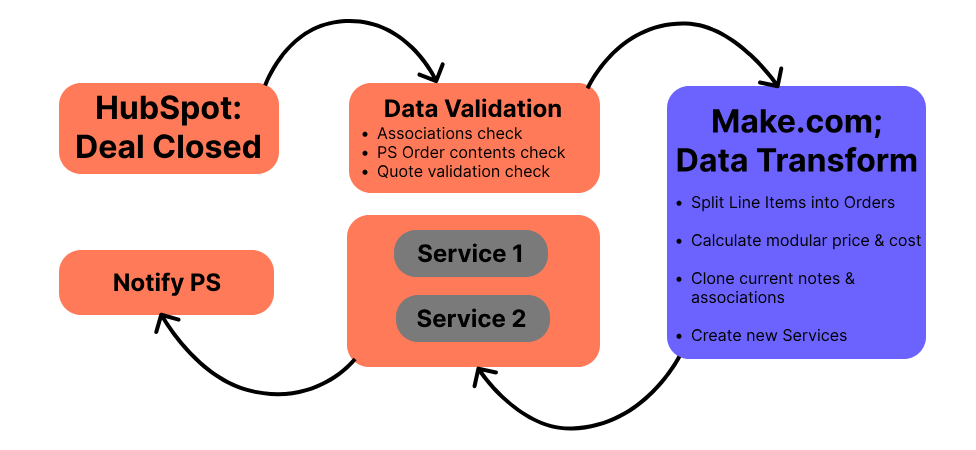
Figure 7. Automated service creation replaced manual PS handoffs and guaranteed every closed deal generated a valid downstream service if required.
Tag-based Product Categorization
| Decision | Replace existing low-product-detail product library with standardized tag taxonomy. |
|---|---|
| Rationale | Simplifies reporting for order, quote, and invoice attributes. |
| Trade-off | Required large one-time cleanup (Reduced quantity of SKUs by 1/2) and ongoing governance. |
| Impact | Allowed for more detailed automation logic (e.g. PS Orders and/or Hardware Orders, treated as separate pieces rather than a funnel). Product library readability and use simplified for onboarding new sales representatives. |
Redundancy and Error Flags
| Decision | Introduce error paths for larger automations as well as delayed retry logic for particular integrations that have stricter human-data requirements. |
|---|---|
| Rationale | Grants visibility into failure reasons. Retry logic covers cases where data needed for an API integration to complete properly is missing, and allows for the stakeholder to self-help. |
| Trade-off | Extra configuration effort both initially and to cover any additional error paths that come up from later iterations. |
| Impact | Initially confusing for users; as each stakeholder ran through a few scenarios in which it occurred, their trust in system elevated and fewer admin tickets were entered. |
Outcomes & Reflection
Outcomes
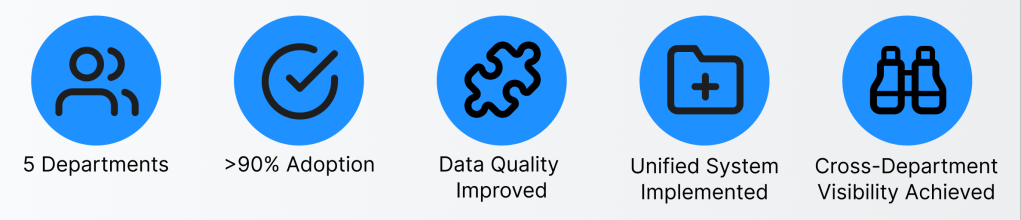
Figure 1. again; Project metrics displaying the highlights achieved.
| Focus Area | Outcome | Detail |
|---|---|---|
| Unified System Adoption | Adoption became universal by all departments within one year of first department’s rollout. | Department-by-department onboarding minimized organizational disruption and built long-term trust in the platform. |
| Operational Efficiency | Processes once handled manually were automated, cutting cycle times from days to hours. | Automated order creation, validation, and notifications replaced manual data entry and spreadsheets across Sales, Fulfillment, PS, Accounting, and Leadership. |
| Data Integrity & Structure | Mismatched data and quantity of missing records dropped sharply following implementation of validation rules and automations. | Cross-object checks and automated guardrails kept inconsistent entries from flowing between systems. Records were created automatically at the stages they previously would have required manual input. |
| Reporting & Visibility | Leadership gained real-time dashboards which replaced manual spreadsheet manipulation and reconciliation. | Pipeline health, revenue forecasts, and departmental KPIs are now accessible without manual exports and manipulation. |
Reflection
What began as a migration project turned into an education in organizational design and business processes.
I learned several lessons from this process, the first being that system design extends beyond just data structure; it encompasses culture, clarity, and resilience.
Iterating with each department and trudging through incomplete data, informal and unfinalized processes, and change resistance taught me the value of progressive discovery and phased adoption. I have tried to ensure that the current architecture balances control and flexibility: being strict enough to maintain data hygiene and enable reporting, yet be adaptable for evolving departmental needs and organizational priority shifts.
If I had the chance to do things over again, I would prioritize the separation of objects rather than nesting things in larger objects (e.g. separating out Orders from Deals, Contracts from Companies, etc.) and value end-reporting more highly, working backwards to accomplish dashboards, but still after the building blocks for that reporting fall into place.
All that being said, I am proud of how I grew throughout this project and look forward to how my next challenges can be simplified by the things I learned here.
Drew
 DREW ZINGLEMAN